What’s an AI Agent—Really?
You’ve likely prompted ChatGPT before. “Write me a tweet thread on quantum physics.” Boom—one and done.
Useful? Absolutely. But agentic? Nope.
An AI agent goes way further. It doesn’t just answer—it reasons.
Here’s the flow:
- You give it a goal.
- It plans steps and picks the right tools.
- It executes.
- It checks its own work—tweaks and repeats if needed.
So instead of “prompt → answer,” think: goal → think → act → improve → done.
It’s like upgrading your AI from a vending machine to a project collaborator.

The RED Turtles of Agent Design
Let’s simplify agent architecture with a mnemonic: RED Turtles Paint Murals.
Each is a design pattern in how agents think and act:
- Reflection – The agent self-critiques. “Did I get this right?” It iterates until it’s confident.
- External Tool Use – It’s not limited to text. Agents can browse, run code, send emails, or analyze images.
- Planning & Reasoning – Step-by-step thinking. It’s the difference between winging it and building a plan.
- Multi-Agent Systems – Just like human teams, agents can collaborate—one writes, another fact-checks, a third manages the workflow.
You don’t need all four at once, but together they unlock the big leagues.

Let’s Talk Teams: The Multi-Agent Playbook
Multi-agent systems are hot. Why work solo when you can build an AI crew? Projects like CrewAI make this not just possible, but practical—even for beginners.
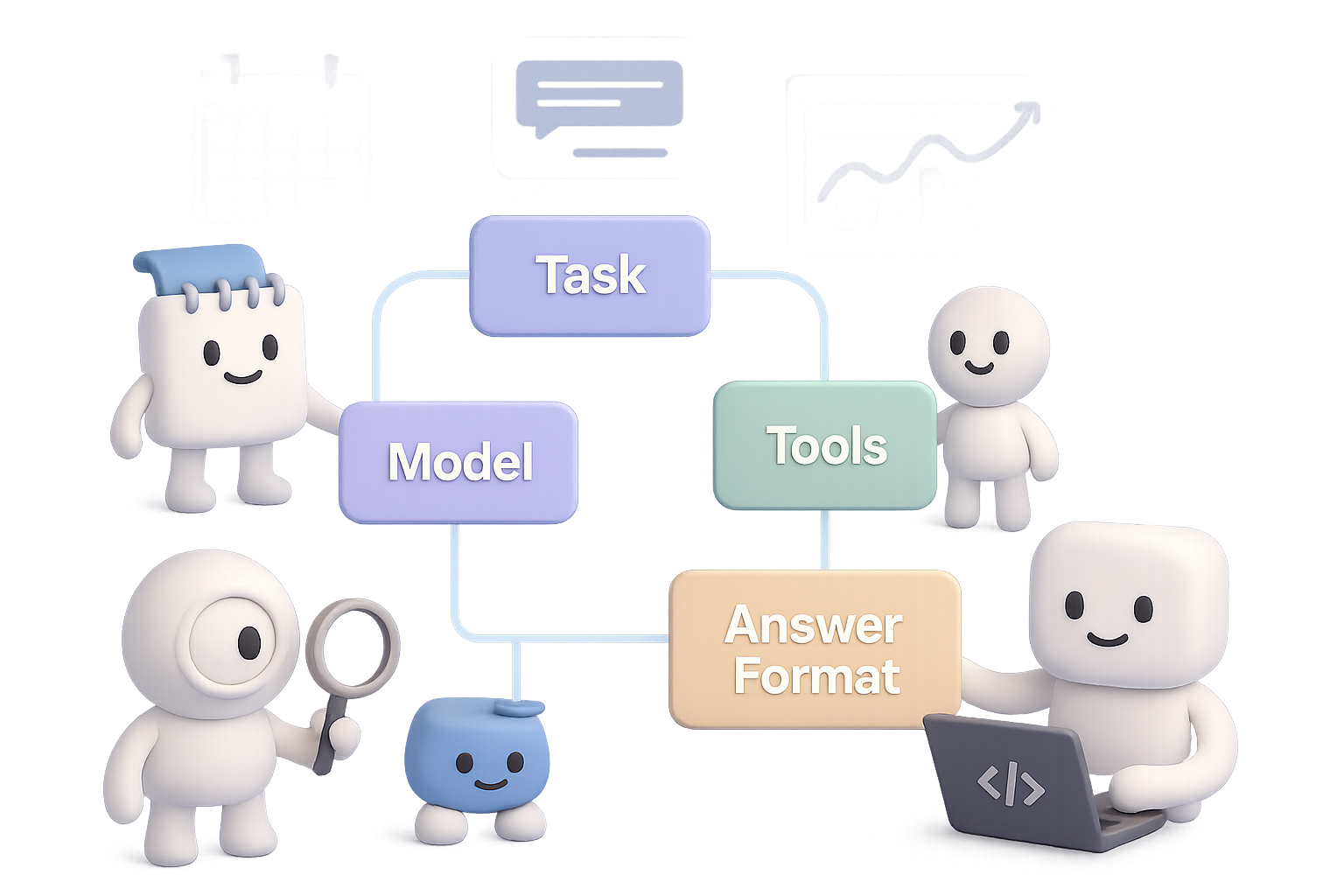
Each agent lives inside a tidy container with the T-A-M-T framework:
- Task – What it needs to do.
- Answer Format – How should it respond?
- Model – GPT-4o Mini, Claude 3, Mistral, Gemini—you name it.
- Tools – APIs or plugins it can call (Google Calendar, Notion, Whisper, etc.).
Connect these containers and you’re in business. Some winning recipes:
- Sequential – One agent hands off to the next, like a factory line.
- Hierarchical – A “manager” agent assigns tasks to specialist agents.
- Hybrid – Combines both with feedback loops. Ups the complexity—and power.
- Parallel – Multiple agents attack the same problem from different angles.
- Asynchronous – Agents that only trigger on specific events. Great for monitoring or alerts.
Smart builds mix and match these to match the job. Think of it like LEGO—but for cognition.

DIY Time: Build Your First Agent Without Writing Code
You don’t need to fire up Python notebooks to make this real.
Platforms like n8n (free, open source) or Make.com (user-friendly, cloud-based) let you snap together agents visually. No setup headaches.
Let’s walk through a real build:
“InkyBot” – a personal Telegram AI assistant
- Trigger: You send a message over Telegram. Could be voice or text.
- Optional: If it’s voice, OpenAI Whisper transcribes it.
- Main Agent Block:
- Uses GPT-4o Mini.
- Hooks into Google Calendar via two tools:
- One reads today’s events.
- One creates new events.
- Chat Loop:
- The agent drafts your to-do list.
- You approve or adjust.
- It books everything for you.
In 15 minutes, you’ve automated your executive assistant. Now imagine plugging in your email, task management, budgeting tools…
Welcome to AI-ops, solopreneur edition.

Big Opportunity: Where AI Agents Go Next
Here’s a spicy prediction from the trenches:
“For every SaaS product, there will be an AI-agent version.”
You name it: Adobe, Salesforce, HubSpot, Canva. Each is a goldmine of repeatable workflows just begging to be agentified.
Pick a domain you know. Spot the bottlenecks. Then build an agent powered by planning, tools, and maybe even a small crew.
One solo builder launched a calendar agent and pocketed $1.2k MRR in 30 days. That’s not a unicorn. That’s doable.

Your Quick Agent Checklist
- An AI agent isn’t just a chatbot—it thinks, acts, and improves.
- The “RED Turtles” are your design compass: Reflect, use External tools, Plan, and go Multi-agent.
- Multi-agent flows let you scale your AI team—CrewAI makes this easy to prototype.
- No-code platforms like n8n or Make.com let you build agents in under 30 minutes.
- There’s green space ahead: match a problem you love with AI workflows—and build something powerful.
Do this next👇
Want a deeper dive into building, experimenting, and sharing with agents? Join the community at Tixu.ai—the beginner-friendly AI learning hub.